Time Tracking Is Now in Superthread. Finally.
Track time on tasks, fill in your weekly timesheet, and turn the work into useful reports without leaving Superthread.
Time tracking should be simple.
You start work. You stop work. At the end of the week, you can see where the time went.
Instead, most teams end up with tasks in one tool, timers in another, and a spreadsheet that nobody wants to fill in on Friday afternoon.
So we built time tracking directly into Superthread.
The timer belongs on the task
This was the obvious starting point.
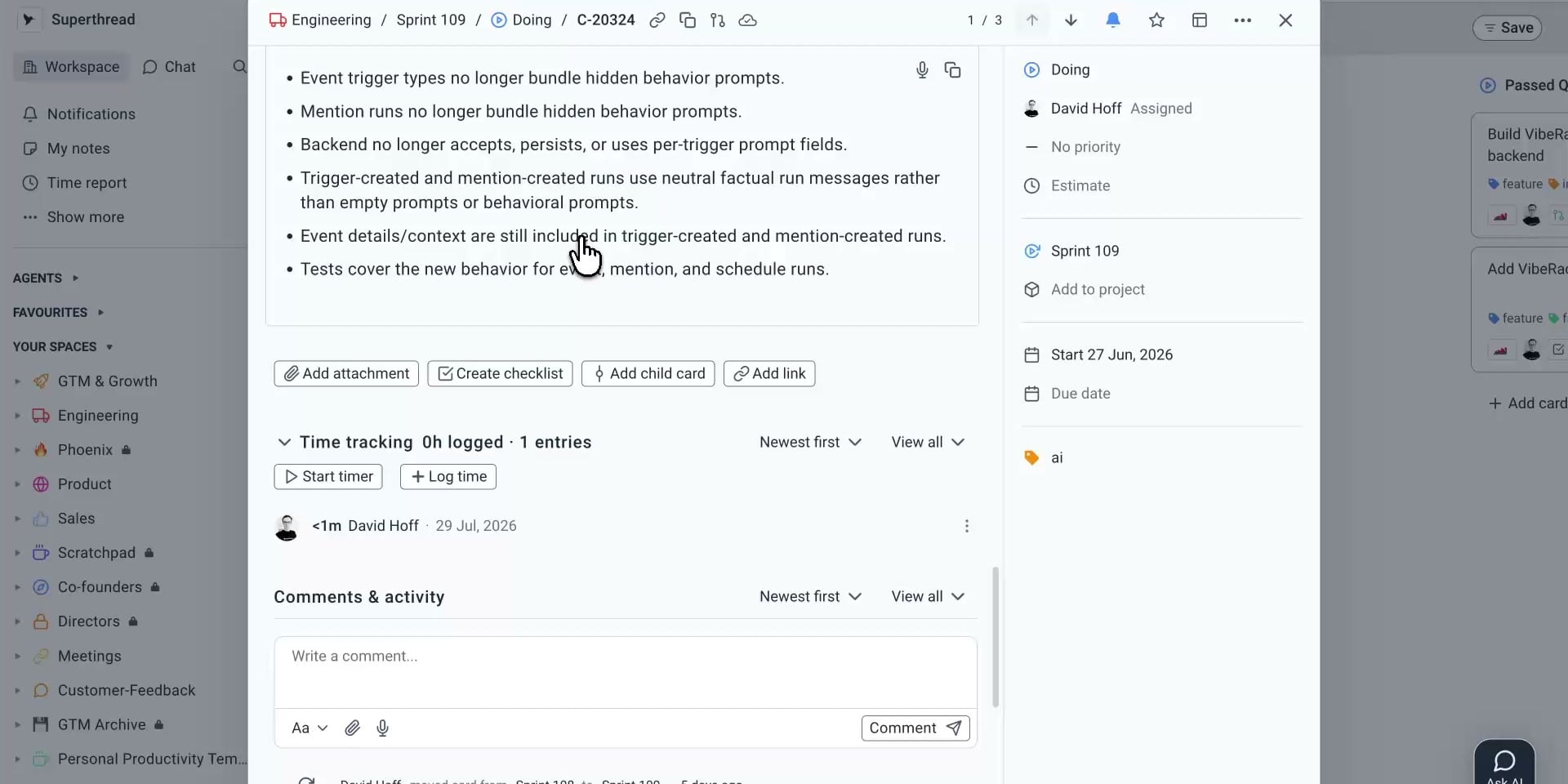
If you are already looking at the work, you should be able to track time there. Open a card and hit Start timer. When you are done, stop it. The time entry stays attached to the task.
You can also log time manually. Add the duration, date, a short description, and whether the work is billable.
That is it.
There is no separate timer app to keep in sync. There is no mystery entry called “Project work” that someone has to decode three weeks later.
Parent tasks also roll up time from their child tasks. So you can see the detail when you need it, or the total when you do not.
Manual time should not be punishment
Timers are useful, but people forget them. I do.
Sometimes you finish the work, close the laptop, and remember the next morning. That should not turn into admin.
Superthread accepts normal durations such as 1h 30m, 1:30, 45m, or
1.5. You can add time from a card or edit it from your weekly timesheet.
The timesheet shows each day, each task, and the weekly total. You can move between weeks and edit a cell without opening every card again.
The goal is not to make people account for every second. It is to make the record useful without making the process annoying.
Reports without the detective work
Once time is attached to real work, reporting becomes much easier.
The time report shows where hours are going across:
- Members
- Projects
- Spaces
- Categories
- Weeks
- Tasks
- Billable and non-billable work
You can filter by date, member, space, board, project, or billable status. You can also export the entries as CSV for invoicing or further analysis.
This is the bit that matters. A report should answer a question. It should not create another job.
Are we spending too much time on support? Did this project take twice as long as expected? How many billable hours are ready to invoice? The answers now sit next to the work that produced them.
Billable time, without turning Superthread into accounting software
Agencies and service teams need rates. They do not need a finance system bolted onto every task.
Workspace admins can set a default hourly rate and choose whether new entries are billable by default. They can also add a different rate for individual members.
The rate is saved when the entry is created. If you change a rate later, old entries stay correct.
You can also lock entries before a date. That is useful after an invoice has gone out. Nobody can casually rewrite last month while fixing this week.
Not every team needs it everywhere
Time tracking is enabled per space.
A consultancy might switch it on for client delivery. A product team might use it for one project. Another team might leave it off entirely.
This is important. We are not trying to turn every card into a timesheet. The feature should appear where it is useful and stay out of the way everywhere else.
There are privacy controls too. A workspace can show full breakdowns, totals only, or keep individual entries visible to admins.
One less tool
Superthread already knows the task, the project, the space, the person doing the work, and how that work fits together.
Time tracking belongs on top of that context.
That is why this is more useful than adding another timer to your menu bar. The time is not floating around on its own. It is part of the system your team is already using to plan and deliver the work.
Start the timer on a task. Fix anything you missed in the timesheet. Use the report when you need the bigger picture.
Simple.